BYOD Threat Boundary: Personal Mobile OS vs Sovereign Enterprise Space
Message Payload
Untrusted Relay / ISP
Zero-Knowledge E2EE
How unmanaged personal phones expose company communications across untrusted cloud backups, app stores, and shared galleries.
Walk into most small and mid-sized businesses in India and you'll see the same thing: the team runs on personal phones. Client calls, WhatsApp groups, email, shared documents, payment screenshots, ID scans. Nobody planned it. It simply happened because everyone already had a phone, and it worked.
This is called BYOD, short for Bring Your Own Device. It saves money and keeps people productive. But it also means your company's client data lives on devices you don't own, don't manage, and can't see into.
This guide explains what actually goes wrong with BYOD, and how to reduce the risk with a short policy and a few low-cost controls, without making your team's life difficult.
Why BYOD Is Risky
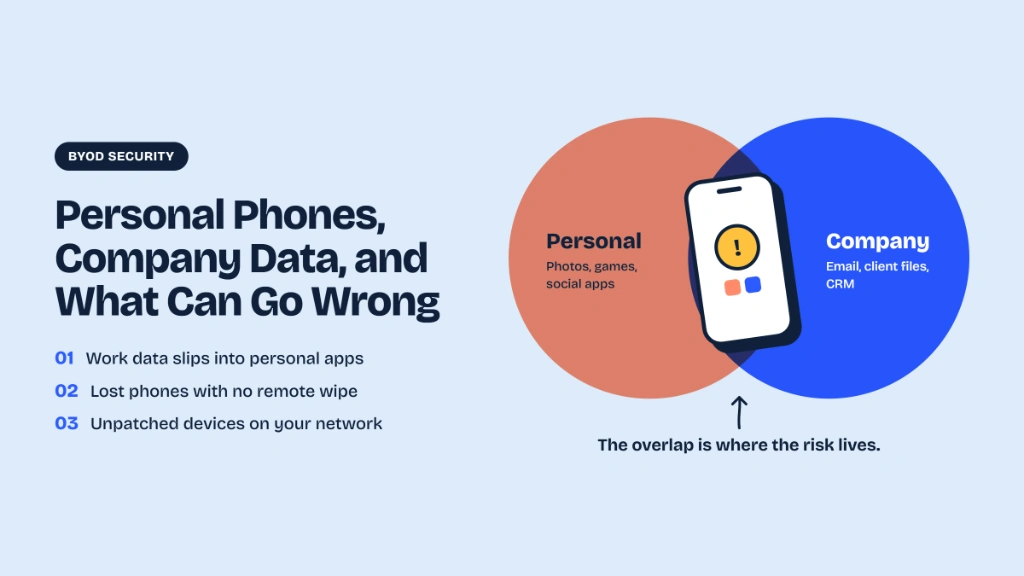
A company laptop usually has a screen lock, an admin, and an IT person who knows where it is. A personal phone has a family, a gaming app, a cracked screen, and a dozen apps nobody has reviewed. The same device carries your clients' contracts and your employee's kids' photos.
That mix creates risks of a different kind than most people expect. It's rarely a sophisticated hacker. It's usually something ordinary.
What Can Go Wrong (9 Real-World Risks)
Lost or Stolen Phones
The most common problem. A phone left in an auto, stolen at a station, or dropped in a taxi can contain years of client conversations and documents. If it has no screen lock, anyone who finds it can read everything. If it has a weak PIN, that's not much better.
Shared and Family Devices
A phone that a spouse, a parent, or a child uses sometimes can expose work apps and files to people with no business seeing them. Photos of client documents in a shared gallery are a classic example.
Outdated Software
Phones that no longer receive security updates, or that sit weeks behind on updates, carry known vulnerabilities. Many personal phones in the real world are older models that have stopped getting patches.
Risky Apps and Downloads
Apps from outside the official stores, cracked apps, and unknown APK files can carry malware that reads messages, captures screens, or steals credentials. Even legitimate apps may ask for permissions they don't need.
Unprotected Backups
Many people back up phones to personal Google or iCloud accounts. Work files and chats then exist in a personal account the company cannot control, sometimes without encryption. When the employee leaves, so does that copy. (We covered one example in Is WhatsApp Safe for Business and Client Communication?)
Mixing Personal and Work
Sending a client document to the wrong chat, forwarding a work message to a family group, or posting a screenshot online by accident. These mistakes are easy when work and personal apps sit side by side.
Public Wi-Fi and SIM-Related Risks
Unsecured networks in cafés and airports, and attackers who convince a mobile operator to move a number to a new SIM (a SIM swap), can compromise accounts that rely on SMS verification.
No Way to Remove Data When Someone Leaves
When an employee quits, there's usually no way to take company data off their phone. That's why BYOD and offboarding go hand in hand.
Phishing on a Small Screen
Fake links and fraudulent messages are harder to spot on a phone, and people respond quickly. A single tap on a bad link can give an attacker access to email or a chat account.
BYOD or Company-Owned Phones?
| Evaluation Criteria | BYOD (Personal Devices) | Company-Owned Phones |
|---|---|---|
| Cost | Low | Higher |
| Control | Limited | Strong |
| Privacy for the Employee | Needs care, since personal and work mix | Clear separation |
| Offboarding | Harder, with data on a personal device | Simple, since you collect the device |
| Best For | Small teams, low-sensitivity data | Teams handling highly sensitive data |
You don't have to choose one for everyone. Many companies provide phones to people who handle the most sensitive data, and allow BYOD with rules for everyone else.
A Simple BYOD Policy: 10 Rules
Put these on one page that every employee reads and signs:
- Lock the phone with a PIN of at least 6 digits, or biometrics. No "swipe to unlock."
- Keep the operating system and apps updated. If the phone no longer gets security updates, it can't be used for client data.
- Install apps only from official stores. No unknown APK files or side-loaded downloads.
- Use only approved apps for client communication and file sharing.
- Don't share the phone with others while work apps are logged in.
- Turn on device encryption and find-my-phone, and report a lost phone immediately, within hours, not days.
- Use an authenticator app instead of SMS for important logins where possible.
- Keep client data out of personal backups, galleries, and personal accounts.
- Don't send client IDs or sensitive documents over personal chat when a secure upload link will do.
- On leaving the company, remove company apps and data from the phone and confirm in writing.
The policy should also say what the company can and cannot see. That's the next point.
Respect Privacy to Get Cooperation
BYOD rules fail when employees feel spied on. A policy that says "we can see everything on your phone" will be ignored or resented, and may also be unfair.
Separate Work From Personal
Where possible, use a work profile (Android) or managed-app features (iOS) so the company only controls the work side.
Targeted Wipes Only
Only wipe company data, not family photos, contacts, or personal apps.
Be Transparent
Tell people exactly what is monitored, what is not, and why.
Get Written Consent
Include the clear BYOD terms in the signed policy before onboarding devices.
Collect only what you need. You don't need to know which personal apps someone uses or monitor off-hours activity.
Low-Cost Controls for a Small Team
You don't need an enterprise budget. For a team of 5–50 people, start here:
- Mobile device management (MDM)-lite: Affordable tools let you enforce screen locks, manage work apps, and wipe company data remotely.
- Work profiles on Android, and managed app controls on iOS: Keep a strict software barrier between work and personal data.
- A password manager for shared credentials: Prevent employees from pasting logins and API keys in unsecured chat rooms.
- An authenticator app or security key: Protect email and critical management dashboards from credential stuffing and SIM swaps.
- An encrypted team messenger: Ensure client conversations live in one company-controlled place and not scattered across personal apps.
- A lost-device routine: Clear protocols on who to call, what gets locked, and what gets wiped in the first 2 hours.
- A short awareness session every few months: Train staff to recognize mobile phishing links and risky shared folders.
The DPDP Angle for Indian Businesses
India's Digital Personal Data Protection (DPDP) Rules are phasing in, with core obligations expected around May 2027. They expect businesses to protect personal data with reasonable security safeguards, to control access, and to report breaches within strict timelines. If client data sits on unmanaged personal phones, it's difficult to show you've met that standard, or to work out what was exposed after a lost device.
BYOD isn't banned, but it needs deliberate controls. Our DPDP Act guide for team messaging explains what the rules expect.
How Lupyd Fits a BYOD Team
Lupyd is an open-source, end-to-end encrypted team messenger. For a BYOD team, using one approved, encrypted workspace for client conversations means less company data scattered across personal apps, and a simpler story when a phone is lost or someone leaves. Because encryption keys live on users' devices, device security still matters, which is why the policy and basic hygiene above come first. You can read the design in our guide on how digital keys and encryption keep your chats safe.
One Approved App
Client chat, calls, and project updates unified in one encrypted container.
Encrypted Group Channels
Personal phones carry zero readable company messages on servers.
Sovereign Team Workspace
Workspace stays with the business when someone leaves, avoiding chat retention.
Verified Open Source
Your security team can inspect cryptographic implementations and code on GitHub.
What You Get with Lupyd
| Lupyd Feature | What It Does | Why It Matters for Your Company |
|---|---|---|
| End-to-end encrypted group chat (MLS) | Team conversations are encrypted with the Messaging Layer Security standard; servers are designed never to read message content. | Client and internal discussions stay private, even from the platform. |
| Firefly chat suite | Open-source chat tools with private channels and easy-to-run clients. | Organize conversations by client, project, or team, and inspect how it works. |
| Audio and video calling | One-to-one and group calls inside the same workspace. | Meetings and quick calls without jumping to another consumer app. |
| Project and task organization | Manage tasks and share project updates without sending roadmaps to third-party clouds. | Keep sensitive plans in one private workspace. |
| Noon anonymous surveys | Workplace surveys and feedback forms designed so submissions can't be traced to individuals. | Honest employee and client feedback without tracking concerns. |
| Message verification | Cryptographic checks that show a message wasn't changed in transit. | Confidence that what you read is what was sent. |
| Open source | Code published on GitHub, with public documentation. | Your security team can verify claims instead of trusting marketing. |
Want the full list? See the Lupyd features page, the FAQ, and pricing.
Try It with Your Team
Move Sensitive Conversations Out of Personal Chat
We're offering free pilots to a small number of teams in legal, healthcare, and finance who want to move sensitive conversations out of personal chat apps. We'll set it up with you, and in return we ask for honest feedback.
Request a pilot →Frequently Asked Questions
What is BYOD?
Bring Your Own Device: employees using their personal phones, tablets, or laptops for work activities.
Is BYOD safe for small businesses?
It can be, with clear rules, basic controls, and strict separation of work and personal data. It is significantly riskier when there are no documented guidelines in place.
Can a company wipe my personal phone?
A company should only remove company data and apps, using tools like a work profile or managed container. It should never wipe personal photos, personal messages, or private files. The policy should state this explicitly.
What if an employee loses their phone?
They should report it immediately within hours. The company can then lock or wipe company data remotely if the device has an enrolled profile, and change all relevant workplace credentials.
Should we ban personal phones for work completely?
Not necessarily. Many SMBs cannot afford company hardware for every role. Provide company phones for staff handling highly sensitive databases, and use BYOD with rules for everyone else.
Does BYOD affect DPDP compliance?
Yes. Safeguards, access control, and breach notification requirements apply equally to personal data sitting on personal devices. BYOD requires documented controls to withstand compliance audits.
Last updated: 11 October 2026. This article is general information and not legal advice.
- ✓ Most Indian SMBs run on unmanaged personal phones mixing client contracts, KYC, and chat backups with personal apps and photos.
- ✓ The primary BYOD risks are operational: lost phones, shared family devices, outdated Android/iOS patches, risky APKs, unencrypted cloud backups, and accidental cross-chat forwarding.
- ✓ A 1-page, 10-rule BYOD policy provides immediate protection without invading employee privacy by focusing strictly on company containers and zero-knowledge tools.
- ✓ Cost-effective controls for teams of 5-50 include Android Work Profiles, iOS managed app containers, password managers, and encrypted team messengers like Lupyd.
- ✓ India's DPDP Act and Rules hold Data Fiduciaries strictly liable for personal data security breaches occurring on unmanaged employee devices.
- ✓ Lupyd prevents BYOD client data leaks with zero-knowledge Messaging Layer Security (MLS) channels that stay with the company rather than personal chat accounts.