Where Search Happens in an End-to-End Encrypted App
Ciphertext only
No index · no queries
Decrypt
Signal · MLS
Index
SQLite FTS5
Query
sanitize · BM25 · MLS check
Show
stream · highlight
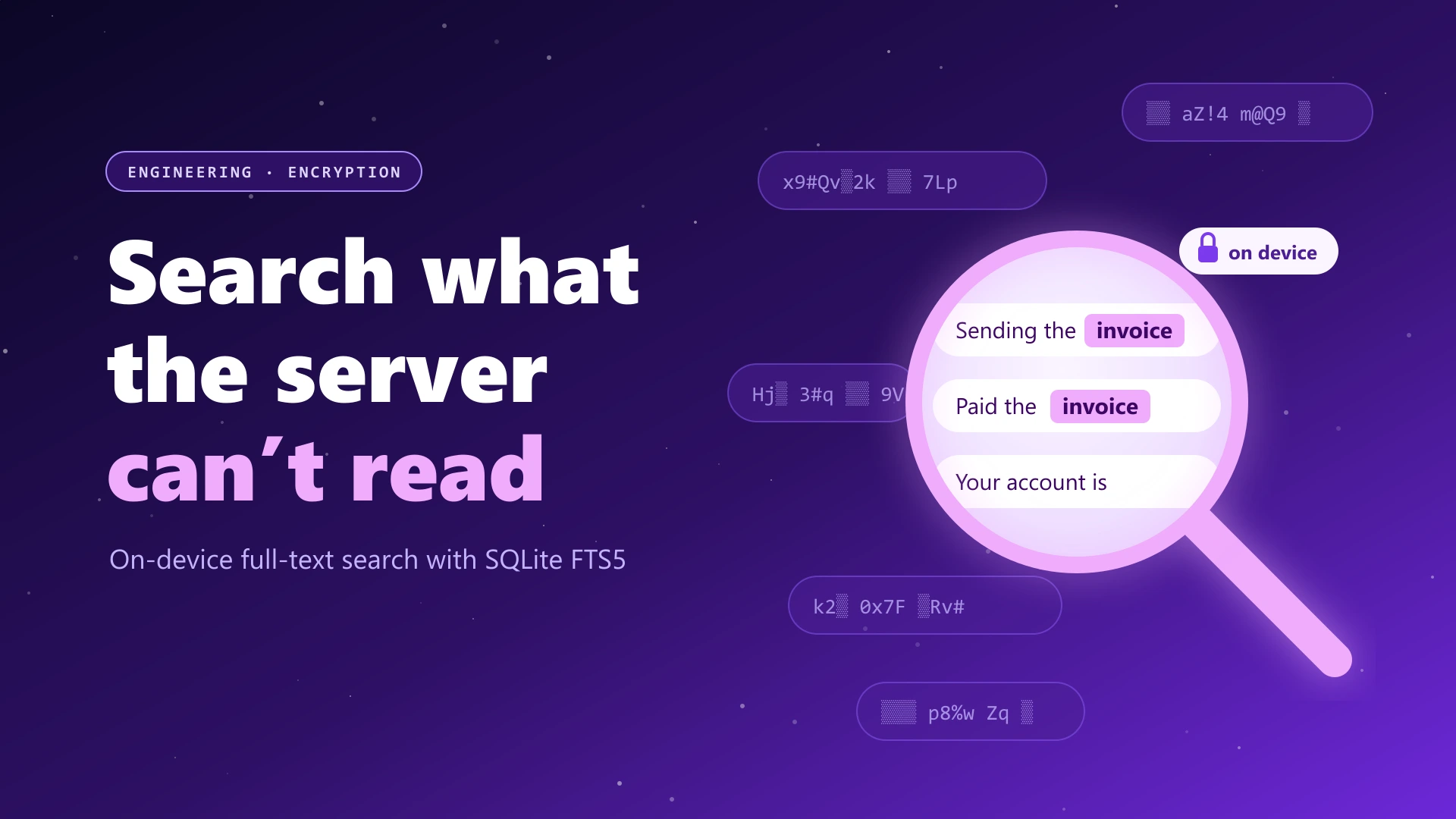
The server only ever holds ciphertext. Decryption, indexing and search all happen on your device.
Search is the feature people miss first when they move to an encrypted messenger. In Slack or Teams you type a word and every message that ever contained it appears instantly, because the server can read them all. With end-to-end encryption the server can't read anything, so it can't search for you either. This post explains how Lupyd searches end-to-end encrypted messages entirely on your device, using SQLite FTS5 and Rust, with the real code from our app.
Why Searching Encrypted Messages Is Hard
A traditional chat server indexes your messages as they arrive. It tokenizes the text, builds an inverted index and answers queries against it. That only works because the server sees the plaintext.
In Lupyd, messages are encrypted with Signal (direct messages) or MLS (groups) before they leave the sender's device. The Firefly server stores and forwards ciphertext. It has nothing to index. If you want to find "invoice" in last month's messages, there are only a few options:
- Searchable encryption. Encrypt the index itself so the server can match queries without reading them. It's an active research area, but it leaks access patterns and adds a lot of complexity.
- Send the query to the server. That defeats the point of end-to-end encryption.
- Search on the device. Each client already decrypts its messages to show them, so it can index them locally too. The server is never involved.
Lupyd does the third. It's the same approach Signal and WhatsApp take for their local search. The interesting part is doing it well: fast, safe against malformed queries, and respecting who's allowed to see what.
Step 1: Decrypt Once, Index Locally
When a message arrives, the Firefly client decrypts it in Rust and stores
it in a local SQLite database: user_messages.db for direct
messages and firefly.db for groups. Alongside the original
protobuf, each row stores the extracted plain text in a
text column. That's the column we search.
// Extract plain text once, when the decrypted message is stored
let text = extract_user_message_text(&row.message);

sqlx::query("INSERT INTO user_messages (id, other, message, text) VALUES (?, ?, ?, ?)")
    .bind(id).bind(other).bind(message).bind(text)
    .execute(&pool).await?;
Because text extraction happens at insert time, search never has to decode protobufs or decrypt anything. It's a plain SQL query over text that's already on the device.
Step 2: SQLite FTS5 for Full-Text Search
A LIKE '%invoice%' query scans every row and gets slower as
history grows. Instead we use SQLite FTS5, SQLite's
built-in full-text search engine. It maintains an inverted index, ranks
results with BM25, and generates highlighted snippets, all inside the
database, with no extra service.
We use FTS5's external content mode. The index stores only the tokens and points back to rows in the real messages table, so the text isn't stored twice. Triggers keep the index in sync whenever a message is inserted, edited or deleted:
CREATE VIRTUAL TABLE user_messages_fts USING fts5(
    text, content='user_messages', content_rowid='rowid'
);

CREATE TRIGGER user_messages_ai AFTER INSERT ON user_messages BEGIN
  INSERT INTO user_messages_fts(rowid, text) VALUES (new.rowid, new.text);
END;
-- plus matching delete and update triggers
The tables use FTS5's default unicode61 tokenizer, which
handles Unicode letters and case-folding across languages. Existing
users get the index built for them: a migration backfills the
text column in batches of 500 rows and runs FTS5's
rebuild command when needed.
Step 3: Never Trust the Search Box
FTS5 has its own query language, with OR,
NOT, NEAR, column filters, wildcards and quotes.
If you pass raw user input to MATCH, a search for
don't or "quoted throws a syntax error, and
special words change the meaning of the query.
So every query goes through a sanitizer first. It splits the input into words, strips stray quotes and asterisks, and turns each word into a quoted prefix term:
// Every word becomes a quoted prefix term, so operators are just words
for word in input.split_whitespace() {
    let clean = word.trim_matches(|c| c == '*' || c == '"' || c == '\'');
    terms.push(format!("\"{}\"*", clean.replace('"', "\"\"")));
}

// "hello world"   ->  "hello"* "world"*
// "NEAR/2 OR NOT" ->  "NEAR/2"* "OR"* "NOT"*
That gives users the behavior they expect from a chat search box:
- Prefix matching: typing
invalready finds "invoice". - All words must match: FTS5 treats space-separated terms as AND.
- No syntax errors or operator tricks:
ORis just a word.
Step 4: Ranking and Highlighted Snippets
The query itself joins the FTS index back to the messages table, ranks by BM25 relevance, and asks SQLite for a highlighted snippet of about ten words around the match:
SELECT um.id,
       snippet(user_messages_fts, 0, '<b>', '</b>', '...', 10),
       fts.rank
FROM user_messages_fts fts
JOIN user_messages um ON um.rowid = fts.rowid
WHERE user_messages_fts MATCH ? AND um.other = ?
ORDER BY fts.rank
LIMIT ? OFFSET ?
In FTS5, rank is a BM25 score where more negative means more
relevant, so we sort ascending. Scope filters such as one conversation
(um.other = ?), one group (gm.group_id = ?) or
one channel (gm.channel_id = ?) are just extra
WHERE clauses. That's what powers the search bars inside a
DM, a group and a single channel.
Step 5: Respecting Channel Permissions
Group search has a twist. A Lupyd group can have channels with different visibility rules, and those permissions live in the MLS group state. Even when a message is in your local database, the search results should follow the same rules as the chat view.
So after the FTS query, group results go through a visibility filter that asks the MLS group whether you can see each channel. The answer is cached per channel, so a hundred results from the same channel cost one check, not a hundred:
// Hide results from channels you can't see. Cached per channel, fails closed.
let can_see = match cache.get(&key) {
    Some(&allowed) => allowed,
    None => {
        let allowed = group.can_see_message(channel_id).await.unwrap_or(false);
        cache.insert(key, allowed);
        allowed
    }
};
Note the defaults: if the group can't be loaded or the check errors, the
answer is false. When in doubt, a message stays hidden.
Step 6: Streaming Results to the UI
The app is built with Tauri,
so search runs in Rust and the UI is a WebView. Rather than waiting for
everything and returning one big response, the Rust command pushes
results to the UI in batches of ten over a Tauri Channel.
For a global search, direct messages and groups are queried
concurrently:
// Search DMs and groups at the same time, streaming batches of 10
tokio::join!(search_dms(&on_event), search_groups(&on_event));
let _ = on_event.send(SearchStreamMessage::Done);
On the frontend, the search bar waits 150ms after the last keystroke, cancels any search that's still in flight, and de-duplicates batches as they arrive. Pressing Ctrl/⌘ + K focuses it from anywhere:
useEffect(() => {
  const timer = setTimeout(() => {
    cancelRef.current = streamSearchMessages(query, { type: "all" }, { onBatch, onDone });
  }, 150); // wait for typing to pause

  return () => { clearTimeout(timer); cancelRef.current?.(); };
}, [query]);
Choosing a result opens the conversation and scrolls to that exact message.
Step 7: Highlighting Without XSS
SQLite marks matches with <b> tags. The quick way to
show them would be to inject the snippet as HTML. In a messenger, that
would let anyone who sends you a message containing HTML inject markup
into your search results.
Instead, the component splits the snippet on the tags and renders every
piece as text, with matches wrapped in <mark>:
snippet.split(/(<b>.*?<\/b>)/g).map((part, i) =>
  part.startsWith("<b>")
    ? <mark key={i}>{part.slice(3, -4)}</mark>   // rendered as text, never HTML
    : <span key={i}>{part}</span>
);
There's no dangerouslySetInnerHTML, so whatever someone types
in a message, it can only ever show up as text.
What the Server Never Sees
| Data | Server-side search (Slack, Teams) | Lupyd on-device search |
|---|---|---|
| Message content | Readable and indexed by the provider | Ciphertext only on the server |
| Search index | On the provider's servers | On your device |
| Your search queries | Sent to and logged by the provider | Never leave your device |
| Works offline | No | Yes |
That last-but-one row is easy to overlook. What you search for can be as sensitive as what you write: a colleague's name, a client, a diagnosis. With on-device search, your queries never leave your device.
Tradeoffs and Limitations
On-device search is the right model for end-to-end encryption, but it comes with real limits:
- You can only search what's on this device. A new laptop can't search messages it hasn't received or synced yet.
- The local database matters. Messages and their search index are stored decrypted in SQLite so the app can show and search them, and the app doesn't currently add its own encryption layer on top of that file. Full-disk encryption (BitLocker, FileVault, or Android and iOS device encryption) is what protects that data if a device is lost, so keep it on.
- It's keyword search, not semantic search. FTS5 matches words and prefixes. Searching "bill" won't find "invoice". Synonym and meaning-based search would need on-device embeddings, which we already use for recommendations but not yet for search.
- Ranking across sources is approximate. Direct messages and groups live in separate indexes, and BM25 scores from two indexes aren't directly comparable. Global results are useful, but not perfectly ordered.
Building This in Your Own App
- Extract text when you insert, not when you search.
- Use FTS5 with external content and triggers so the index can never drift out of sync.
- Sanitize every query into quoted prefix terms. Never pass raw input to
MATCH. - Apply the same permission rules as your chat view, and fail closed.
- Stream results and debounce input so the UI stays responsive.
- Render snippets as text, never as HTML.
- Remind users to keep disk encryption on. The local database is now the most valuable file on the device.
Frequently Asked Questions
Can you search end-to-end encrypted messages?
Yes, on your own device. The server can't read encrypted messages, so it can't search them. Instead, the app indexes messages locally after decrypting them. Lupyd uses SQLite's FTS5 full-text search engine for this.
Does Lupyd send my search queries to its servers?
No. Search runs entirely on your device against a local database. Your queries and results never leave the app.
Why can't I find old messages on a new device?
On-device search only covers messages stored on that device. Because the server can't read your messages, it can't search your full history for you. Messages need to be on the device before they can be found.
What is SQLite FTS5?
FTS5 is SQLite's built-in full-text search extension. It builds an inverted index of words, ranks results with the BM25 algorithm, and can return highlighted snippets, all inside a local database file with no separate search server.
Is on-device search less secure?
It keeps messages and queries away from the server, which is the main goal of end-to-end encryption. The tradeoff is that the device holds a readable copy of your messages, so device security matters: use a screen lock and keep full-disk encryption turned on.
Conclusion
End-to-end encryption doesn't have to mean giving up search. It means moving search to the only place that can read your messages: your own device. With SQLite FTS5, a careful query sanitizer, MLS-aware permission checks and results streamed from Rust, Lupyd gives you instant search across your chats without the server ever seeing your messages or what you searched for.
Curious how those messages get encrypted in the first place? Read How Encryption and Keys Work and libsignal vs MLS.
- ✓ With end-to-end encryption the server only stores ciphertext, so search has to run on the device.
- ✓ Lupyd extracts message text at insert time and indexes it with SQLite FTS5, kept in sync by triggers.
- ✓ Every query is sanitized into quoted prefix terms, so FTS5 operators and stray quotes can't break or change a search.
- ✓ Results are ranked with BM25, highlighted with FTS5 snippets, and filtered by MLS channel permissions that fail closed.
- ✓ Rust streams results to the Tauri UI in batches; the UI debounces input and renders highlights as text to avoid XSS.
- ✓ Search covers only messages on the device, and the local database relies on device disk encryption for protection at rest.
The workspace where nothing leaks
End-to-end encrypted channels and chat for your team, built on the Signal Protocol and MLS. Available on macOS, Windows, Linux and Android.