A Lupyd Push Notification, Step by Step
- 01 Firefly server → Google FCM { "ty": "umsg" }, no sender, no text, offline devices only
- 02 FCM → Android wakes the app · Kotlin calls Rust over JNI
- 03 Rust → Firefly server connects over WebSocket · receives encrypted messages
- 04 On the phone decrypt (Signal / MLS) · mute and mention checks
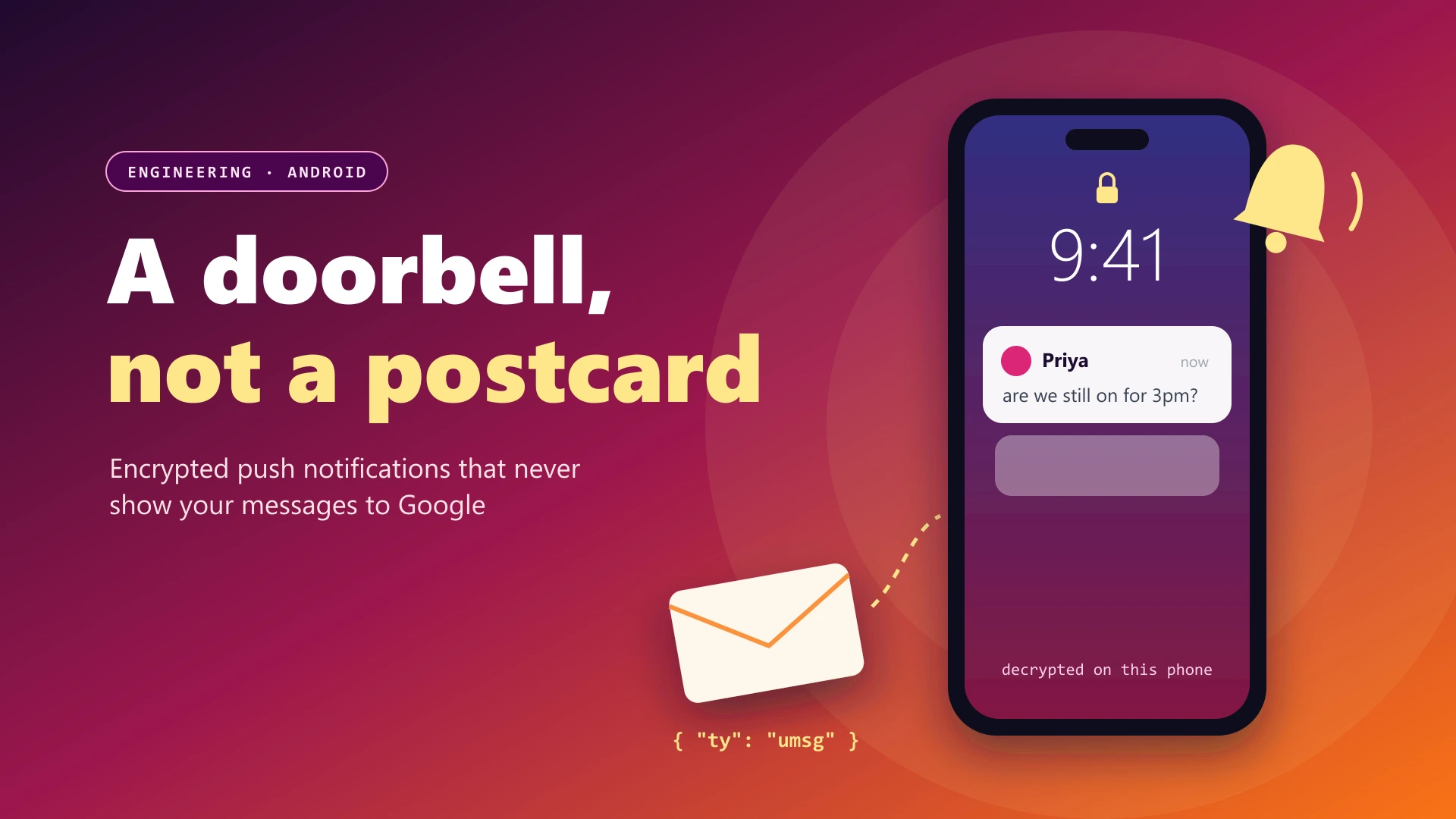
- 05 Local notification "Priya: are we still on for 3pm?", written on the device
Google delivers a wake-up signal with no message data. The message itself is fetched and decrypted on the phone.
Push notifications are where many "encrypted" apps quietly leak. To show "Priya: are we still on for 3pm?" on your lock screen, something has to know the sender and the text. If that something is the push service, then Google (for Android's Firebase Cloud Messaging) or Apple sees it too. This post explains how Lupyd delivers notifications for end-to-end encrypted messages on Android without putting any message content in the push.
The Push Notification Problem
On Android, apps can't keep a connection open in the background forever. The OS kills idle processes to save battery. The official way to reach a sleeping app is Firebase Cloud Messaging (FCM): your server sends a message to Google, Google delivers it to the device, and Android wakes your app to handle it.
The easy approach is to put the notification text in the FCM message: sender name, message preview, maybe a group name. It works, it's instant, and it means every message preview passes through Google's infrastructure. For an end-to-end encrypted messenger, that's unacceptable.
There are two common ways to fix it:
- Encrypted payload: put the ciphertext in the push, and decrypt it on the device. The content is hidden, but it's limited by FCM's payload size and adds complexity.
- Wake-up only: send a push that carries nothing except "you have something new." The app wakes, connects to its own server and fetches the encrypted messages itself.
Lupyd uses the second approach. Here's how it works, end to end.
Step 1: The Server Sends a Content-Free Push
This is all the FCM message contains when the Firefly server notifies you of a new chat message or an incoming call:
// The entire push the server sends for a new message or call
json!({
    "message": {
        "token": token,
        "android": { "priority": "high" },
        "data": { "ty": "umsg" }
    }
})
No sender, no text, no group name, no message ID. Just
"ty": "umsg" and a high-priority flag so Android delivers it
promptly. Even if someone could read every FCM message, all they would
learn is that a device received a notification at a certain
time.
And the server only uses FCM when it has to. If your device already has a live WebSocket connection, the encrypted message goes straight down that connection and no push is sent at all:
if let Some(socket) = sockets.get(&device) {
    socket.send(encrypted_message).await;        // online: deliver directly
} else if !is_self {
    fcm.notify_user_with_new_msgs(device).await; // offline: content-free push
}
Step 2: Android Hands Off to Rust
On the phone, a standard FirebaseMessagingService receives
the push. It does almost nothing itself. It packages the (tiny) payload
and hands it to our Rust code through JNI:
override fun onMessageReceived(remoteMessage: RemoteMessage) {
    val payload = JSONObject(remoteMessage.data as Map<*, *>).toString()  // {"ty":"umsg"}
    EncryptionBridge.handleFcmMessage(this, payload, applicationInfo.dataDir) // hand off to Rust
}
This is possible because Lupyd's Android app is built with
Tauri. The
whole app, including the Firefly encryption client, is one Rust library
(app_lib). Kotlin can call into it directly, even when the
app's UI isn't running.
Step 3: Wake Up, Sync and Decrypt
The Rust handler starts the Firefly client. It restores the signed-in session, opens the local databases and connects to the Firefly server over a WebSocket. Then it waits up to eight seconds for the sync to deliver something:
// Wake the Firefly client: restore session, open databases, connect
initialize_firefly_client(app_data_dir).await?;

// The push says nothing, so wait for sync to deliver the real messages
tokio::time::timeout(Duration::from_secs(8), FCM_NOTIFY.notified()).await;
Over the WebSocket, the server delivers the pending messages exactly as it stored them: encrypted. The Firefly client decrypts them on the device, using the Signal protocol for direct messages and MLS for groups. The keys never leave the phone. That's the same decryption path the app uses when it's open. There's no separate, weaker "notification mode."
Step 4: Build the Notification on the Device
Once a message is decrypted, it's saved to the local store. If no UI is running to show it, Rust builds a native Android notification itself:
async fn on_message(&self, message: UserMessage) {  // already decrypted on the device
    store.insert_user_message(message.clone()).await;

    if EVENT_CHANNEL.receiver_count() == 0 {           // no UI running
        NotificationManager::get().handle_user_message_background(&message).await;
    }
    FCM_NOTIFY.notify_waiters();
}
The notification text, "Priya: are we still on for 3pm?", is created
entirely on your phone from data your phone decrypted. Lupyd groups
notifications per conversation using Android's
MessagingStyle, showing the last few messages from each
person or group, and tapping one deep-links straight to that chat or
channel.
Mutes, Mentions and Foreground Suppression
Because the decision to notify happens on the device, after decryption, Lupyd can make smart decisions that a server-side push system couldn't make without reading your messages:
- Foreground suppression. If you're already looking at that conversation, you don't get a notification for it.
- Muted users, groups and channels, with optional expiry times.
- Mention overrides. A muted channel can still notify
you when someone writes
@yournameor@everyone, depending on your preferences.
let mentioned = (text.contains(&format!("@{me}")) && prefs.notify_on_mentions)
    || (text.contains("@everyone") && prefs.notify_on_everyone);

if is_muted { mentioned && prefs.notify_on_mentions } else { true }
A server can only check for "@priya" in a message if it can read the message. Here, the check runs against the decrypted text on your device, so mention notifications work with end-to-end encryption.
Encrypted Inline Replies
Android lets you reply directly from the notification shade. In Lupyd, that reply goes through the same Rust bridge. It's encrypted on the device with the same Firefly client and sent over the encrypted channel, without opening the app:
// Inline reply: encrypted and sent by the same Rust client
external fun sendReply(context: Context, other: String, text: String,
                       isGroup: Boolean, appDataDir: String)
What About Incoming Calls?
Calls follow the same rule. When someone calls you and none of your
devices are online, the server holds the call offer and sends the same
content-free umsg push. Your phone wakes, connects, and only
then receives the call details over the WebSocket. If a device reconnects
within 45 seconds, the server forwards the pending offer to it. The
caller's identity reaches your phone through Lupyd's own connection, not
through Google. We covered the calling stack in
Why Lupyd Chose Cloudflare for Calls.
What Google Can and Can't See
| Information | Typical push (text in payload) | Lupyd wake-up push |
|---|---|---|
| Message text | Visible to the push service | Never in the push |
| Sender name | Visible to the push service | Never in the push |
| Group or channel name | Often included | Never in the push |
| That a device got a push, and when | Visible | Visible (unavoidable with FCM) |
The last row is worth stating plainly. Any app that uses FCM reveals timing metadata to Google: this device token received a push at 14:02. A wake-up-only design minimizes what the push says, but it can't hide that a push happened. Sending pushes only to devices that are offline helps keep even that to a minimum.
The Tradeoffs
- Slightly slower notifications. The phone has to wake, connect and sync before it can show anything. On a good connection that's quick. On a poor one, the notification arrives later than a text-in-payload push would.
- Limited background time. Android gives a woken app a short window to do its work. If sync can't finish in that time (for example, on a very slow network), the notification may not appear until the app next connects.
- Battery and data. Each push opens a real connection instead of just displaying text. Sending pushes only to offline devices keeps that cost down.
- Decrypted data on the device. To show previews and search, messages are stored decrypted locally. Keep a screen lock and device encryption on.
For an end-to-end encrypted messenger, we think a slightly slower notification is the right price for keeping messages out of the push service.
Checklist: Building Private Push Notifications
- Send no content in the push. A type field is enough.
- Only push offline devices. Use your own connection when it's open.
- Reuse the app's normal decryption path for background sync. Don't build a weaker shortcut.
- Build notifications on the device, after decryption.
- Make mute and mention decisions on the device, where the plaintext already is.
- Keep secrets and message text out of logs, including push tokens and notification bodies.
- Be honest about metadata. Push timing is visible to the push provider.
Frequently Asked Questions
Can Google read Lupyd messages through push notifications?
No. Lupyd's push notifications for messages and calls contain only a type marker, with no message text, sender or group name. The app fetches the encrypted messages from Lupyd's server and decrypts them on your phone.
How do end-to-end encrypted apps show message previews in notifications?
The preview is created on the device. The push only wakes the app, which downloads and decrypts the new message locally, then builds the notification itself. Some apps instead put encrypted data in the push and decrypt it on the device.
What does Firebase Cloud Messaging see?
FCM sees the push payload and delivery metadata, such as which device token received a push and when. With Lupyd, the payload contains no message content, so FCM only learns that a push was delivered.
Why do encrypted notifications sometimes arrive late?
With a wake-up push, the phone has to connect to the messaging server and decrypt the message before it can show anything. On slow networks, or under aggressive battery optimization, that takes longer than displaying text sent inside the push.
Do mention notifications work in muted channels?
Yes, if you enable it. Lupyd checks for @mentions on your device after decrypting the message, so a muted channel can still notify you when someone mentions you or uses @everyone.
Conclusion
A push notification should be a doorbell, not a postcard. In Lupyd, the
server rings the doorbell through Google with an empty
{"ty": "umsg"}, and your phone opens the door itself: it
connects to Lupyd, fetches the encrypted message, decrypts it with keys
that never leave the device, and writes the notification locally. You
get message previews, mentions and inline replies, and the push service
never sees your messages.
Want to go deeper? Read how Lupyd searches encrypted messages on your device or what makes digital communication secure.
- ✓ Lupyd's server sends FCM pushes containing only {"ty": "umsg"}: no message text, sender, or group name.
- ✓ Pushes are only sent to devices without a live WebSocket; online devices receive encrypted messages directly.
- ✓ On Android, Kotlin hands the push to Lupyd's Rust core via JNI, which connects, syncs, and decrypts messages with Signal or MLS on the device.
- ✓ Notification text is built locally after decryption, so mutes, @mention overrides, and foreground suppression work without the server reading messages.
- ✓ Inline replies from the notification shade are encrypted in Rust and sent through the same Firefly client.
- ✓ FCM still reveals delivery timing metadata, and wake-up pushes can be slightly slower than text-in-payload pushes.
The workspace where nothing leaks
End-to-end encrypted channels and chat for your team, built on the Signal Protocol and MLS. Available on macOS, Windows, Linux and Android.