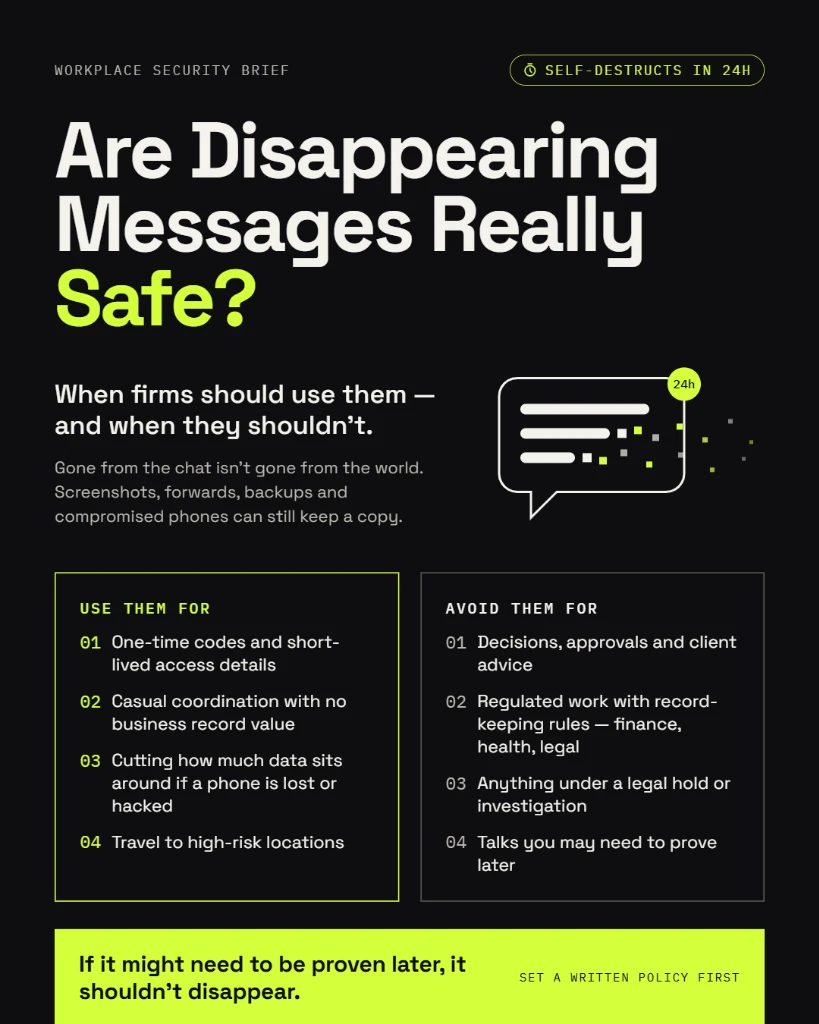
Short answer: they help, but they are not a safety guarantee. Disappearing messages delete chats from devices after a set time, which shrinks how much data can leak later. But anyone in the chat can still screenshot, forward, or photograph a message before it vanishes.
For professional firms, the bigger question is not “are they safe?” but “when should we use them?” Used well, they cut risk. Used carelessly, they can delete records your firm is legally required to keep. This guide explains both sides in plain language.
About Lupyd:
Lupyd is an end-to-end encrypted team workspace built in India for CA firms, law firms and businesses. Client chats and files stay readable only by your team, so privacy never depends on messages vanishing. Try Lupyd →
What Disappearing Messages Are
Disappearing messages are chats that delete themselves after a timer runs out. You switch them on for a chat, pick a duration, and every new message in that chat is removed from both sides when the time is up. Messages sent before you turned it on stay.
Most popular messaging apps now offer some version of this feature:
| App | Timer options | Who can turn it on in a group |
|---|---|---|
| 24 hours, 7 days, or 90 days | Anyone, unless admins restrict it in group settings | |
| Signal | From seconds up to several weeks, or custom time | Anyone, unless admins restrict it |
| Telegram | Auto-delete timer in chats; self-destruct in Secret Chats | Group admins only |
WhatsApp also lets users set a default timer so every new chat starts with disappearing messages switched on by default.
What Disappearing Messages Do Not Protect Against
A timer controls how long a message lives inside the app. It cannot control what people do with it before then. These are the critical gaps every firm must understand:
Screenshots and photos
Anyone in the chat can screenshot the message on their phone, or photograph the screen using another device.
Forwards and copy-paste
A message can easily be forwarded to an external chat, copied into email, or pasted into notes before the timer expires.
"Kept messages" on WhatsApp
On WhatsApp, anyone in the chat can bookmark or choose to "Keep" a disappearing message so it never vanishes.
Saved media in gallery
Photos, PDFs, and documents stay in the recipient phone's gallery or download directory if auto-download is enabled, even after vanishing from the chat.
Quoted replies
If someone replies to a disappearing message, the quoted text can permanently remain preserved inside their subsequent reply.
A compromised device
If a colleague's phone is stolen, unlocked, or infected with malware, an attacker can access and read all messages before the countdown finishes.
Disappearing Messages vs End-to-End Encryption
These two features are often confused, but they solve completely different security problems:
- End-to-End Encryption (E2EE) decides who can read a message.
- Disappearing Messages decide how long that message exists.
| Security Aspect | End-to-End Encryption | Disappearing Messages |
|---|---|---|
| What it protects | The message while it travels and is stored | The message after its useful life |
| Stops app provider from reading it | Yes | No, not on its own |
| Stops network eavesdropping / Wi-Fi hackers | Yes | No, not on its own |
| Reduces data exposed if phone is lost later | No | Yes |
| Stops screenshots by chat participants | No | No |
A disappearing message sent in an app without end-to-end encryption can still be intercepted or read by the provider while it exists on their servers.
For real protection, firms need both: encryption first, then sensible auto-deletion timers on top. This is the foundation Lupyd is built on: every team conversation and shared file is end-to-end encrypted by default.
When Firms Should Use Disappearing Messages and When They Should Not
- • One-time credentials: Sharing an OTP, temporary password, or portal access code with a colleague.
- • Transitory client IDs: Sending a client's PAN, Aadhaar, or bank details to a team member once the details are already safely filed in your official software.
- • Pre-decision brainstorms: Quick internal discussions or sensitive negotiations before a formal decision or advice note is documented.
- • Everyday coordination: Meeting timing, directions, lunch plans, and "I'm on my way" logistics.
- • Client instructions & approvals: If a client approves a tax return, a contract term, or a settlement in chat, your firm needs that audit trail as legal proof.
- • Statutory books & accounts: Any receipts, vouchers, calculations, or files tied to accounts and GST.
- • Disputes and pending litigation: Deleting messages once a dispute, tax scrutiny, or litigation is anticipated can be construed as destruction of evidence.
- • Team handovers: If the project background vanishes, incoming colleagues cannot pick up context or verify history.
Legal Record-Retention Rules for Indian Firms
Indian law sets strict mandatory retention windows for CA firms, corporate advisors, and businesses. If client communications or shared calculation sheets vanish without being mirrored to your primary records, your firm risks substantial statutory penalties:
| Governing Law | What Must Be Kept | Mandatory Minimum Period |
|---|---|---|
| Companies Act, 2013, Section 128 | Books of account, vouchers, and financial records | 8 financial years |
| CGST Act, 2017, Section 36 | GST accounts, registers, invoices, and electronic records | 72 months (6 years) from annual return due date |
| Income-tax Rules | Books of account and supporting transaction records | Approx. 6 years from end of relevant assessment year |
What the DPDP Act 2023 Adds:
Under the Digital Personal Data Protection (DPDP) Act, 2023, data fiduciaries must erase personal data once its processing purpose has been fulfilled, unless retention is required under another applicable law. Disappearing messages can help prevent indefinite accumulation of personal data, but your firm's documented retention policy must govern the distinction.
Disclaimer: This section provides general business compliance context, not legal advice. Always review retention obligations with your firm's legal counsel.
A Simple Disappearing-Messages Policy for Your Team
Most firms can define their internal communication guidelines in a single concise page. Here is a battle-tested template to roll out across partners and staff:
Encrypted app only
Sensitive client work happens strictly within an end-to-end encrypted workspace such as Lupyd, never over unencrypted consumer channels.
Save first, then share
Any client instruction, engagement letter, or document must be saved in your official DMS or practice management software before being referenced in disappearing chats.
Short timers for temporary secrets
OTPs, temporary passwords, portal login credentials, and ID scans must use a 24-hour timer or shorter.
No timers for business records
Client approvals, scope sign-offs, fee agreements, and tax deliberations must remain in standard chat or formal mail.
Disable media auto-download
Staff work devices must have automatic media download disabled so confidential attachments do not silently accumulate in phone galleries.
Strict prohibition on client screenshots
Institute an explicit written policy forbidding screenshots of confidential client information, explaining the security rationale.
Immediate freeze during disputes (Litigation Hold)
If any client matter faces potential scrutiny, audit, or legal proceedings, immediately suspend disappearing message timers across all related team and client chats.
Annual review
Review communication guidelines annually and whenever relevant regulatory standards or team tools update.
How Lupyd Helps: Privacy Without Losing Your Records
Disappearing messages are often used as an awkward patch for a deeper problem: conducting confidential business communication on consumer tools that were never architected for professional firms.
Lupyd repairs the foundation. Built in India specifically for CA firms, law firms, and corporate teams, Lupyd keeps your team's conversations and shared client documents completely end-to-end encrypted by default.
Because your data is genuinely confidential at rest and in transit, your firm never has to rely on messages prematurely disappearing just to keep them away from prying eyes. You satisfy regulatory retention mandates effortlessly while enjoying bank-grade privacy.
| What Your Firm Needs | Personal Chat Apps (WhatsApp / Telegram) | Lupyd Team Workspace |
|---|---|---|
| End-to-end encrypted team workspace | Yes, on some apps; no centralised control | Yes, by default for all chats & files |
| Separation of work from family & personal chats | No: high risk of misdirected messages | Yes: dedicated professional workspace |
| Encrypted file sharing for client tax/legal docs | Partly: downloads leak to personal gallery | Yes: sandboxed, encrypted file management |
| Built for professional compliance in India | No | Yes: DPDP Act aligned and CA/law-firm ready |
Ready to Move Client Communication to a Private Workspace?
Getting started takes minutes: download the app, create your workspace, invite your partners and staff, and keep your client files confidential without risking your compliance audit trails.
Try Lupyd →Frequently Asked Questions
Are disappearing messages really safe?
They reduce how much historical data remains stored on phones over time, which shrinks the fallout of a stolen or lost phone. However, they cannot prevent screenshots, forwarded messages, camera photos, or malware extraction. Treat them as one layer of hygiene, not complete security.
Can someone screenshot a disappearing message?
Yes. On WhatsApp, Signal, and most other messaging applications, any participant can capture a screenshot of a disappearing message or photograph the device display using another phone or camera.
Are disappearing messages deleted from the server?
In true end-to-end encrypted apps (like Signal, WhatsApp, and Lupyd), the server never holds an unencrypted readable copy of your messages in the first place. The timer instructs the client applications to delete the message locally from both sender and recipient devices once the countdown concludes.
Can deleted disappearing messages be recovered?
Usually they cannot be undeleted from within the chat UI. However, copies may survive indefinitely in unencrypted device backups, media galleries (if auto-download was enabled), quoted replies in other chats, or notification logs on some operating systems.
Should a CA firm use disappearing messages?
Yes, but strictly for temporary secrets such as portal OTPs, passwords, and sensitive client ID numbers that have already been entered into your core practice software. You should never use them for client instructions, filing approvals, tax computations, or accounting records required under Section 128 of the Companies Act.
Is it legal to use disappearing messages for business in India?
Using disappearing messages is not inherently illegal. The primary legal risk occurs when firms inadvertently delete statutory records mandated by the Companies Act, GST Act, or Income Tax Act, or destroy electronic records once a dispute or government inquiry has been initiated.
Are disappearing messages the same as end-to-end encryption?
No. Encryption determines who has the cryptographic key to read a message. Disappearing messages determine how long that message persists. Professional firms require end-to-end encryption first; timers are merely a complementary data hygiene measure.
What is a secure app for professional firms to share client data?
An end-to-end encrypted workspace built specifically for business teams, such as Lupyd. It isolates client communications from personal WhatsApp groups, enforces workspace access controls, and encrypts both conversations and attachments while preserving required firm records.
The Bottom Line
Disappearing messages are valuable for short-lived secrets, but they are not a substitute for a complete security strategy. Protect client conversations with end-to-end encryption first, preserve all records required by law, and use auto-deletion timers only where information holds no lasting audit value.
Try Lupyd and provide your team with an encrypted workspace where client data stays strictly private and your compliance records remain intact.
Is WhatsApp Safe for Business and Client Communication? • Is Google Chat End-to-End Encrypted? What Businesses Should Know • Secure Client Communication for Law and CA Firms • Two-Factor Authentication: A Plain-Language Guide for Partners and Staff
Last updated: 29 October 2026. This article is general compliance and security information and does not constitute formal legal counsel. For specific advice regarding statutory retention obligations, consult your firm's qualified legal or compliance advisor.
- ✓ Disappearing messages only manage how long data persists; they cannot prevent screenshots, exports, forwards, or camera photos before deletion.
- ✓ Auto-deletion does not replace end-to-end encryption; privacy requires cryptographic protection first, with timers serving only as data hygiene.
- ✓ Indian statutory laws (Companies Act s.128, CGST Act s.36, Income Tax Act s.44AA) require financial and tax records to be preserved for 6 to 8 years.
- ✓ Disappearing messages should only be used for transient operational secrets (one-time codes, temp passwords, logistics) and never for client approvals or audit trails.
- ✓ Firms need clear messaging policies and dedicated encrypted workspaces so client communications remain secure without destroying mandatory compliance records.
The workspace where nothing leaks
End-to-end encrypted channels and chat for your team, built on the Signal Protocol and MLS. Available on macOS, Windows, Linux and Android.